AI website testing
AI website testing: what a useful browser check should prove
AI website testing uses an agent to navigate a site and check an observable user outcome. For a small product team, a useful first job is checking whether a visitor can reach pricing, trust information, or another important public page on both desktop and mobile. The report should show the journey, checkpoint, observed result, and reproduction evidence. A pass applies to that check and session—not the entire website.
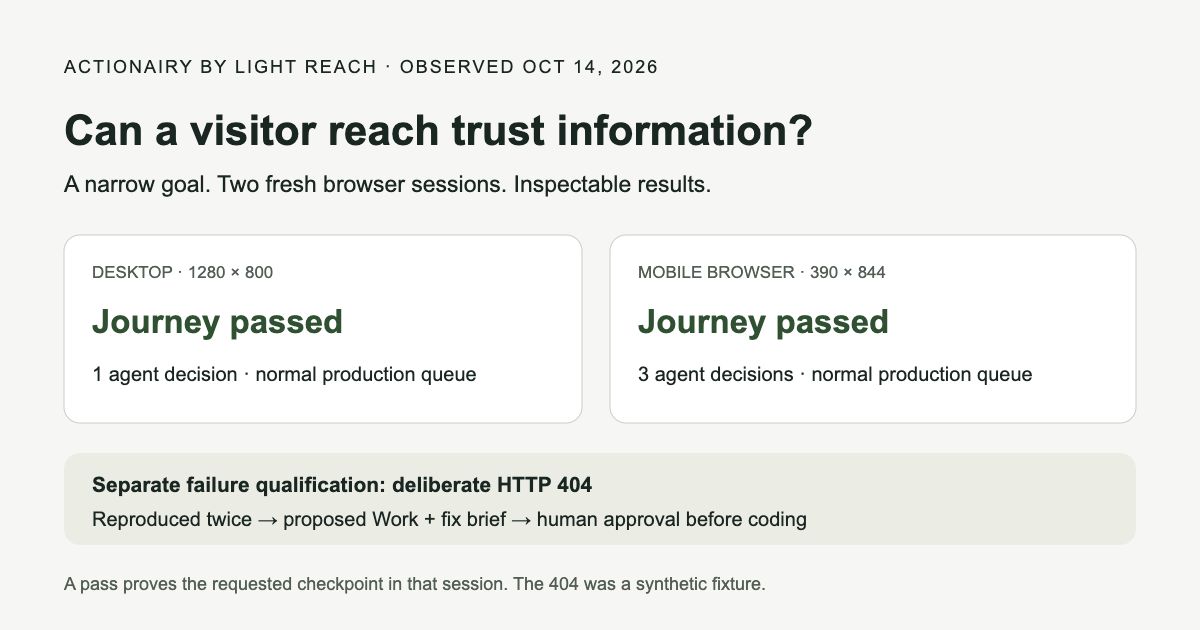
A real check: can a visitor find trust information?
We ran this goal through Actionairy’s released Product checks: “Open Privacy and inspect the trust center page. Do not sign in or submit anything.” The check was saved and executed through the normal production queue, browser worker, and governed inference route. It reached a passing result at a desktop viewport of 1280 × 800 and a mobile viewport of 390 × 844 in separate fresh browser sessions on October 14, 2026.
The desktop run recorded one agent decision; the mobile run recorded three. That difference is a reminder to test the mobile journey separately: navigation may require different actions. It is not a performance comparison, and one successful run per layout does not establish reliability across browsers, devices, or future releases.
The goal checked access to trust information. It did not validate the legal completeness of that page, every link on the site, visual polish, or a sign-in flow. The case-pack download includes the goal, viewport sizes, observed status, and limits without private account identifiers or screenshots.
Date: 2026-10-14 (UTC)
Goal: Open Privacy and inspect the trust center page.
      Do not sign in or submit anything.
Desktop 1280 × 800: passed; 1 agent decision
Mobile   390 × 844: passed; 3 agent decisions
Execution: normal production queue, fresh browser sessions
Meaning: the requested public journey passed in these runs
Give the agent a checkpoint, not “test my website”
A broad request produces an ambiguous report. Start with the user’s intended outcome, the starting page, the acceptable end state, and the actions the check must avoid. “Reach the published pricing page without signing in” gives a reviewer something concrete to verify. “The website works” does not.
Choose journeys that matter to a prospective buyer. For a public B2B site, start with product → pricing, homepage → trust information, and product → contact or signup entry. At the final step, inspect the destination and stop before submitting personal data or creating an account. Testing a published form is a separate scope with its own authorized data and cleanup plan.
Our downloadable cases describe these journeys in plain language. Replace the starting URL and expected destination with your own. Run the desktop and mobile versions independently, and save the evidence before changing the site.
- Start: the exact public HTTPS page and a fresh browser session.
- Goal: the outcome a visitor needs, such as finding the published pricing information.
- Checkpoint: the expected page or visible content and an acceptable response.
- Limits: no sign-in, purchases, account creation, or form submission.
- Layouts: a desktop viewport and a mobile viewport, recorded separately.
- Evidence: steps, observed state, destination, and anything that blocked completion.
A failure needs a second reproduction
To qualify the failure path, we deliberately used an unavailable route. The expected page returned HTTP 404, and the failure was reproduced in two fresh sessions. Actionairy created proposed Work with private evidence and a fix brief; it did not start coding. This was a synthetic fixture designed to check the reporting path, not a newly discovered defect in a customer website.
For your own site, preserve the starting URL, actions, expected checkpoint, actual response, viewport, and time. Repeat the journey in a fresh session. If the second attempt succeeds, keep the first observation but report the uncertainty rather than declaring a permanent defect. A slow response, blocked request, or an agent choosing the wrong control can require a different diagnosis.
The useful engineering handoff connects the failure to a specific user outcome and a proposed acceptance check. For a broken pricing destination, the check might require a successful response and visible published pricing after following the product-page link. An HTTP 200 alone would still miss a blank page or an application error rendered with a successful status.
Expected: the configured public acceptance page loads
Observed: start page returned HTTP 404 / Not Found
Repeated: twice in separate fresh browser sessions
Result: proposed Work + reproduction evidence + fix brief
Implementation: not started; human approval required
Classification: synthetic qualification fixture
Four ways a “passed” check can hide a problem
The checkpoint is too weak. A visible heading can coexist with a broken action underneath it. Tie the checkpoint to the journey you care about, and use an explicit assertion for an exact required value or state.
The agent takes an unintended shortcut. Opening the destination URL directly may prove that the page exists while missing a broken navigation link. Preserve the starting point and require the route a visitor would use.
A desktop pass is reused as mobile evidence. A menu, sticky overlay, or narrow layout can change how the same destination is reached. Record the mobile result separately; a mobile browser viewport still does not prove native-app behavior or behavior on every physical handset.
The report removes inconclusive runs. Timeouts, unavailable inference capacity, and blocked pages need their own visible status. Treat them as incomplete observations until the journey has actually been checked. Keep the denominator when reporting a pass rate.
How does AI browser testing fit with Playwright?
An agent is useful when the question involves navigating a visible interface from a human goal. A scripted check is useful when your team already knows the precise invariant and needs a repeatable regression check. Use a confirmed discovery to sharpen the owned test rather than relying indefinitely on a broad agent instruction.
Playwright’s Trace Viewer provides action history, DOM snapshots, screenshots, errors, and network details for recorded tests. These are useful evidence for explaining a failure to an engineer. Keep traces with private sessions, credentials, or customer data within their authorized workspace; publish a sanitized example separately.
The choice depends on the job. A public trust-page journey can be a small agent check. An exact billing calculation belongs in the appropriate application test. An authenticated checkout or a destructive workflow needs an explicit authorized scope. None of these substitutes for the others.
What Actionairy currently offers
Actionairy by Light Reach is an AI teammate for product and engineering. Product checks in Work run fresh-session public HTTPS browser journeys in desktop and mobile layouts. Reproduced failures can become proposed engineering work with evidence and a fix brief attached. You approve implementation and release.
The checks sit alongside source-linked research, value assessments, and approved work. That makes the report useful in a product decision: what failed, who is affected, what is worth changing, and how the change will be checked. Expected business value remains an estimate until measured.
Authenticated browser journeys and native-app automation are outside this released check scope. Our first-party observations demonstrate the bounded journeys and synthetic failure path described above; they are not an independent tool benchmark or evidence of measured customer revenue. Start with one important public journey and inspect the result before expanding coverage.
Sources and further reading
- Reusable website-check cases on GitHub, by Light Reach
- Dated journey definitions and first-party results
- Actionairy capability and proof record
- Playwright: Trace Viewer documentation
- Actionairy product capabilities
Prepared by Light Reach with AI assistance, using the linked public sources and product documentation. Examples and unmeasured outcomes are labeled in the guide.